A quote says what a job should cost. Whether it actually did, you would otherwise only notice from the bank balance — and by then you do not know why. Job costing puts the two side by side while you can still learn something from it: per cost type, in your business's currency.
You find it in the project, in the main tab Job costing next to Overview. It is only visible in the office.
1. Deciding what to compare against
At the top right is Select documents. There you tick the documents whose calculation forms the calculated side — you can choose from cost estimate, quote, order confirmation and the invoices including interim invoices. Delivery notes are missing because they carry no prices, and so are invoice corrections and cancellation invoices: they repeat the calculation of an invoice that is already in the list.
Do not tick the quote and the invoice of the same job together. The invoice carries the quote's calculation forward; both together count the same costs twice. Take the quote — or, if a lot changed during the work, the invoice.
There is only a calculated side if the line items carry a price calculation, that is, if they are broken down into labor, material and the other cost types — how that works is explained under Creating services and materials.
2. Recording the actual costs
In the Job costing tab, Record costs is at the top right. The dialog has three tabs:
| Tab | What goes in it |
|---|---|
| Recorded hours | The hours booked to the project — you do not enter anything here. Show all times takes you to time tracking. |
| Incoming invoices | Invoices from suppliers and subcontractors that are not allocated under Incoming invoices: Type, Invoice number, Description and Amount (net). |
| Materials used | Material from your own stock: Type, Quantity, Unit, Description and Cost price — Zirko calculates Cost price total. |
An incoming invoice that you assign to this project under [Incoming invoices](/hilfe/eingangsrechnungen) appears here by itself — as Material, with the allocated amount net plus the tax that does not come back as input tax. So only enter in this tab what is not allocated there.
What does not come back is, for example, the PST in British Columbia and Saskatchewan and the RST in Manitoba, the part a partial input tax deduction does not cover, and in Japan the part the transitional rule does not let you deduct for a supplier without a T number. The invoice counts gross if your business deducts no individual input tax at all: under the small business scheme, the net tax rate method (Switzerland), 簡易課税 (Japan) or the Quick Method (Canada) — and every business in the USA. This is set in the Input tax card under Setting tax rates.
If an allocated invoice should count as a different cost type — as subcontracted work, say —, enter it here with its Invoice number. Then your line counts instead of the allocation, and nothing counts twice.
Add row adds a new row. The Type is one of the five cost types: Labor, Material, Equipment, Subcontracted work, Other.
Zirko calculates the labor costs itself: recorded hours times the rate from the person's wage group — the same rate the quote is calculated with. If someone has no wage group, their hours are not counted, and Zirko says so: “No hourly rate is on file for …”. In that case, assign the person to their group instead of trusting the figure.
3. Reading the result
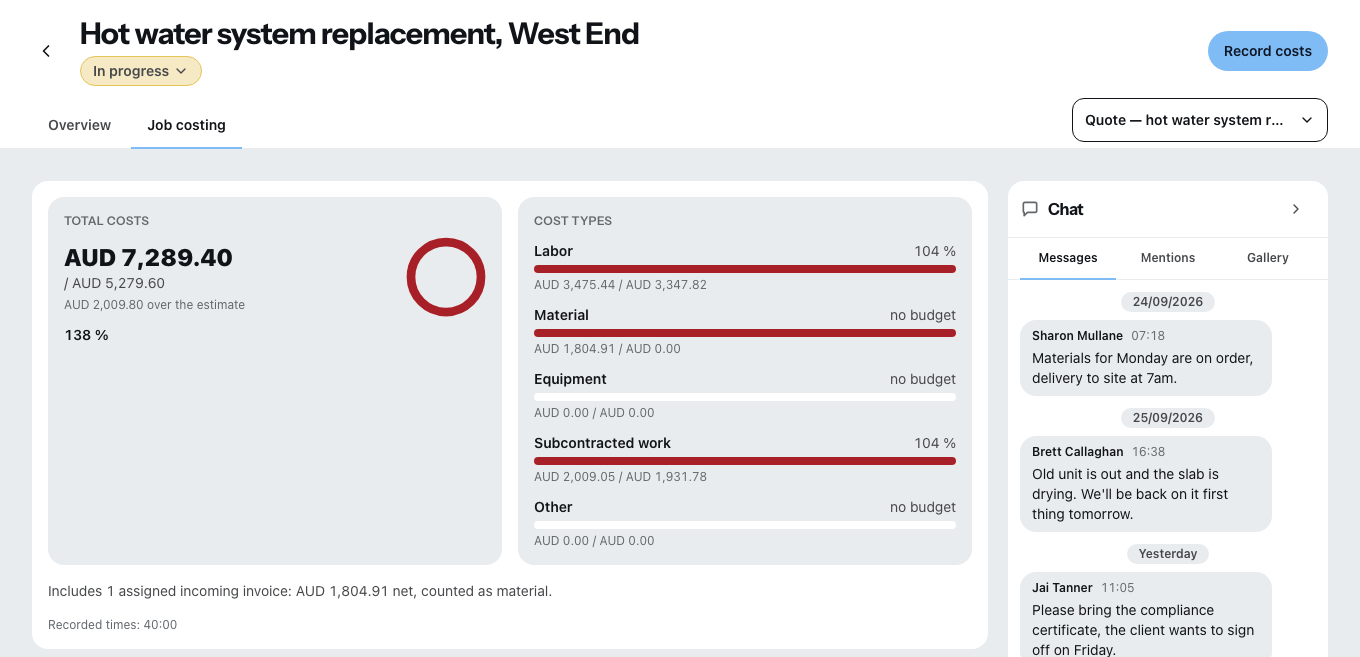
- Total costs shows the actual costs against the calculated ones, with the share as a percentage and the sentence “… over the estimate” or “… under the estimate”.
- Cost types shows the same for each of the five types separately. That is where you see where it got more expensive — usually it is one type, not all of them.
Below the total costs it says how many allocated incoming invoices are in them and with what sum — and how much of it is tax your business does not deduct as input tax. What counts on the individual invoice is explained under Recording incoming invoices. What does not count is named there too: an invoice in a different currency, and one you have already entered by hand with the same invoice number.
Without chosen documents there is no percentage, but a note that there is no comparison value. That is intentional: a zero would be a claim.
Plan and permissions
Job costing and recording new costs belong to the Team and Company plans; during the trial every business has them. What has already been recorded stays saved in every plan and is included in the data export. Mobile roles see neither job costing nor cost prices.